Published on 25/02/2026
This version requires the following software versions as prerequisites :
- ARender : 2023.17.0
- Redis : 6.2.12
- OpenSearch : 1.3.19
Légende
- Native feature
- Feature requires configuration to be activated
- Feature requiring development to be activated
- Premium feature
Overview
FlowerDocs 2025.4.0 is a minor release that includes bug fixes and security updates. It also offers a new directory configuration to ensure optimal and consistent performance, regardless of how the directory is organised.
Upgrade notes
You can find out about the major technical changes in this version by consulting the upgrade notes here
For Users
Optimization of notifications to update the data model
The data model update, which allows users to benefit from the latest updates to the data model, has been revised to be more reliable and less intrusive in a high-availability environment.
Users could be interrupted by the frequent display of a notification prompting them to refresh the page, even when there were no apparent changes. This behavior has been corrected to ensure that this notification now only appears when a real update or configuration change requires it.
The ARender viewer, improvements
FlowerDocs now includes ARender 2023.17.0, which incorporates numerous enhancements since version 2023.15.0, resulting in a more stable, accurate and efficient viewing experience.
The main contributions to FlowerDocs:
- The performance has been enhanced by reducing the number of requests when scrolling through documents, thus ensuring a smoother navigation experience.
- The quality of conversion has been optimised, with improved rendering of emails to PDF (image management) and Office documents.
- Security and Stability: Integration of critical security patches and updates to server components (Spring Boot).
- Interface and Annotations: Corrections have been made to improve the ergonomics of the user interface and the accuracy of the display of annotations.
For comprehensive details on these developments, please refer to the Release Notes ARender
Data entry: work faster with copy and paste
In our ongoing efforts to optimize the user experience, we have decided to disable the Lasso feature by default. This change is intended to streamline data entry by promoting the use of copy and paste, a more direct and natural method common to all everyday applications.
It should be noted that when working with documents containing native text, the ARender viewer facilitates seamless information selection and copying, followed by pasting into the designated field. This method proves significantly more efficient than the Lasso feature, as it reduces the number of clicks and eliminates intermediate validation steps.
For integrators
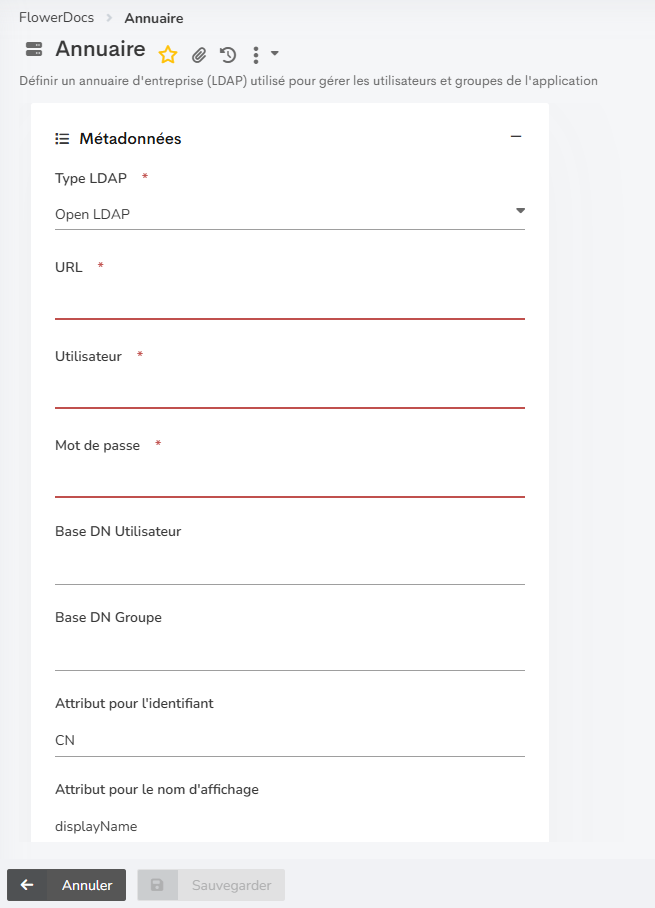
Directory configuration
FlowerDocs is evolving to guarantee optimal and equivalent performance regardless of how the directory is organized.
It is now possible to precisely target the location of data:
- Unified configuration: A single search base for users and groups (classic method).
- Segmented configuration: The ability to define two separate bases.
For operators
Security Enhancements (CVE Fixes)
Several CVEs have been addressed in this version. Specific details are withheld to protect against exploit attempts.
Optimization of the data model update mechanism
The mechanism for verifying configuration changes (check-update) has been optimized for complex infrastructures (high availability, clusters behind a reverse proxy).
For more information, please refer to the upgrade notes: here
Bug fixes
| Bug | Ticket support |
|---|---|
| Users | |
| Annotation - After deleting a page with annotations, it is still possible to view the remaining annotations and/or add and save new annotations. The annotations on the deleted page are still saved in FlowerDocs. | TMAFLW-424 |
| Search - Date-type search criteria can be entered manually without necessarily using the calendar. | TMAFLW-1174 and TMAFLW-1226 |
| Delegation - Delegations are taken into account when the user who received the delegation logs in using their login and password or SSO login. | TMAFLW-1177 |
| Updating the data model - The data model refresh pop-up is only displayed after an administrator has modified the data model. | TMAFLW-664 and TMAFLW-1087 |
Know issues
- Updating the data model : Update notifications may still appear occasionally after an initial update has been accepted or following a forced browser refresh (CTRL + F5), even if no changes have been made to the template.
FlowerDocs eProcess
Overview
No specific changes have been made to this version. It benefits from the following corrections and improvements made by FlowerDocs.
Bug fixes
| Bug | Ticket support |
|---|---|
| Users | |
| Repository - When making changes to a value entered in the Reference tag, the cursor will now remain at the location selected by the user. It will no longer automatically return to the end. | TMAFLW-1007 |
| Repository - Calls to the repository from the search form are optimised to avoid an accumulation of searches on virtual folders. | TMAFLW-1165 |
FlowerDocs GEC
Overview
No specific changes have been made to this version. It benefits from the following corrections and improvements made by FlowerDocs.
Bug fixes
| Bug | Ticket support |
|---|---|
| Users | |
| Repository - When making changes to a value entered in the Reference tag, the cursor will now remain at the location selected by the user. It will no longer automatically return to the end. | TMAFLW-1007 |
| Repository - Calls to the repository from the search form are optimised to avoid an accumulation of searches on virtual folders. | TMAFLW-1165 |
Bug fixes
| Bug | Ticket support |
|---|---|
| Utilisateurs | |
| Référentiel GED - Lors de la modification d’une valeur saisie dans le tag Référence, le curseur reste à l’emplacement souhaité par l’utilisateur. Il ne revient plus automatiquement à la fin. | TMAFLW-1007 |
| Référentiel GED - Optimisation de l’appel au référentiel GED depuis les formulaires de recherche afin d’éviter une accumulation des recherches sur les dossiers virtuels | TMAFLW-1165 |